
Poisson on CPU#
This tutorial walks through solving a 1D Poisson problem with Ginkgo on the CPU. Every code block below is part of a single executable that you build with CMake and run from the shell. By the end you will have:
A working CG + block-Jacobi solver for the discrete Poisson system,
Numerical evidence that the solver works (a small error reported to the console, plus a CSV dump you can plot),
A small mesh-refinement loop so you can watch the error behave as the grid is refined.
A companion tutorial — Poisson on GPU — re-uses the same code, swapping only the executor.
What we’re solving#
The problem is the one-dimensional Poisson equation with Dirichlet boundary conditions:
We pick a manufactured solution \(u(x) = x^3\). Substituting, \(-u'' = -6x\), so \(f(x) = -6x\) with \(u_0 = 0\) and \(u_1 = 1\). Working with a manufactured solution is handy: we know the exact answer and can measure the discretisation error directly.
![Exact solution u(x) = x^3 on [0, 1] with 16 interior grid points marked](../../_images/poisson-solution.svg)
The exact solution and the \(K = 16\) interior grid points your code will solve for. The boundary nodes (squares) are imposed; the solver computes the values at the dots.#
Discretising on \(K\) interior points with spacing \(h = 1/(K+1)\) using the 3-point stencil \(\{-1,\, 2,\, -1\}/h^2\) yields a tridiagonal symmetric positive-definite system \(A \, u = b\). CG is a textbook fit, and a simple diagonal (block-Jacobi with block size 1) preconditioner is enough to keep iteration counts low.
Prerequisites#
You need a working Ginkgo installation that includes at least the Reference backend. Any of the standard install paths from Install Ginkgo works — for this tutorial nothing else is required. If you also have the OMP backend compiled in, you can swap the executor in one line to get multi-threaded execution; we’ll point this out below.
Project layout#
Create a fresh directory with two files:
poisson-cpu/
├── CMakeLists.txt
└── poisson_cpu.cpp
The CMakeLists.txt is a stock find-Ginkgo-and-link recipe:
cmake_minimum_required(VERSION 3.16)
project(poisson_cpu CXX)

find_package(Ginkgo REQUIRED)

add_executable(poisson_cpu poisson_cpu.cpp)
target_link_libraries(poisson_cpu PRIVATE Ginkgo::ginkgo)
If Ginkgo isn’t on the default CMake search path, point CMake at it with
-DGinkgo_DIR=<install>/lib/cmake/Ginkgo (or
-DCMAKE_PREFIX_PATH=<install>) when configuring.
Walk-through#
We’ll build poisson_cpu.cpp in pieces. Each snippet below adds one section;
the final assembled file appears in Full program.
Headers and type aliases#
#include <cmath>
#include <fstream>
#include <iostream>
#include <vector>

#include <ginkgo/ginkgo.hpp>

using ValueType = double;
using IndexType = int;

using Csr    = gko::matrix::Csr<ValueType, IndexType>;
using Dense  = gko::matrix::Dense<ValueType>;
using Cg     = gko::solver::Cg<ValueType>;
using Jacobi = gko::preconditioner::Jacobi<ValueType, IndexType>;
Csr is the standard sparse matrix format for SPD problems like this one.
Dense is Ginkgo’s dense-vector / dense-matrix class — we’ll use it for the
right-hand side and the solution vector. Jacobi with the default block
size 1 is diagonal preconditioning.
Choosing an executor#
auto exec = gko::ReferenceExecutor::create();
// auto exec = gko::OmpExecutor::create();  // multi-threaded CPU
The ReferenceExecutor is the single-threaded, fully portable CPU backend
that ships with every Ginkgo build. If you compiled Ginkgo with
-DGINKGO_BUILD_OMP=ON, swap the line for gko::OmpExecutor::create() and
the rest of the program stays identical — that’s the point of the
executor abstraction. See Execution backends
for the broader picture.
Building the stencil matrix#
The 3-point stencil for \(-u''\) on an interior point \(i\) is
with the \(-u_{-1}\) and \(-u_K\) neighbours moving to the right-hand side as boundary contributions. Multiplying through by \(h^2\) keeps the matrix entries simple — the stencil becomes \(\{-1, 2, -1\}\) and the RHS picks up an \(h^2\) factor (we handle that in the next section). The matrix has at most three non-zeros per row, with \(3K - 2\) entries in total:
std::unique_ptr<Csr> build_matrix(std::shared_ptr<const gko::Executor> exec,
                                  int K)
{
    auto mat = Csr::create(exec, gko::dim<2>(K, K), 3 * K - 2);
    auto row_ptrs = mat->get_row_ptrs();
    auto col_idxs = mat->get_col_idxs();
    auto values   = mat->get_values();

    int pos = 0;
    row_ptrs[0] = 0;
    for (int i = 0; i < K; ++i) {
        if (i > 0)     { col_idxs[pos] = i - 1; values[pos++] = -1.0; }
        col_idxs[pos]  = i;     values[pos++] =  2.0;
        if (i < K - 1) { col_idxs[pos] = i + 1; values[pos++] = -1.0; }
        row_ptrs[i + 1] = pos;
    }
    return mat;
}
A small subtlety: we allocate the CSR with Csr::create(exec, size, nnz),
which gives us read/write access to row_ptrs, col_idxs, and values
directly. We’re free to do this because exec is a CPU executor here — on a
device executor we’d build on the host and then clone to the device, which
is exactly what the GPU tutorial does.
Building the right-hand side#
The boundary conditions flow into the first and last RHS entries. The \(h^2\) factor that we left out of the matrix comes back in:
std::unique_ptr<Dense> build_rhs(std::shared_ptr<const gko::Executor> exec,
                                 int K, double u0, double u1)
{
    auto rhs = Dense::create(exec, gko::dim<2>(K, 1));
    auto vals = rhs->get_values();
    const double h = 1.0 / (K + 1);
    for (int i = 0; i < K; ++i) {
        const double xi = (i + 1) * h;
        vals[i] = -6.0 * xi * h * h;      // f(x_i) * h^2 with f(x) = -6 x
    }
    vals[0]      += u0;                   // boundary contribution at x = 0
    vals[K - 1]  += u1;                   // boundary contribution at x = 1
    return rhs;
}
The solver factory#
auto solver_factory =
    Cg::build()
        .with_criteria(
            gko::stop::Iteration::build().with_max_iters(2u * K),
            gko::stop::ResidualNorm<ValueType>::build()
                .with_reduction_factor(1e-12))
        .with_preconditioner(Jacobi::build())
        .on(exec);
Two stopping criteria are combined: an iteration cap so a divergent run can’t loop forever, and a residual-norm criterion that stops as soon as the relative residual drops below \(10^{-12}\). With Jacobi preconditioning and an SPD tridiagonal of this size CG converges in tens of iterations — well below the cap. For a tour of the available criteria, see Stopping criteria.
Generate and solve#
auto matrix = build_matrix(exec, K);
auto rhs    = build_rhs(exec, K, /*u0=*/0.0, /*u1=*/1.0);
auto u      = Dense::create(exec, gko::dim<2>(K, 1));
u->fill(0.0);

auto solver = solver_factory->generate(gko::share(std::move(matrix)));
solver->apply(rhs, u);
generate(...) performs solver setup — for CG that means binding the
operator and constructing the preconditioner. The factory wants a
shared_ptr<const LinOp>, and gko::share(std::move(matrix)) is the
standard one-liner that hands ownership over. solver->apply(rhs, u) runs
the iteration. The result lands in u; on a CPU executor we can read it
back directly with u->get_const_values().
Verifying the result#
We compare against \(u(x) = x^3\):
double max_err = 0.0;
const double h = 1.0 / (K + 1);
const auto* uv = u->get_const_values();
for (int i = 0; i < K; ++i) {
    const double xi = (i + 1) * h;
    max_err = std::max(max_err, std::abs(uv[i] - xi * xi * xi));
}
std::cout << "K = " << K
          << ",  max |u_h - u_exact| = " << max_err << '\n';
Optional: dump a CSV for plotting#
std::ofstream out("poisson_cpu.csv");
out << "x,u_computed,u_exact\n";
out << 0.0 << ',' << 0.0 << ',' << 0.0 << '\n';
for (int i = 0; i < K; ++i) {
    const double xi = (i + 1) * h;
    out << xi << ',' << uv[i] << ',' << xi * xi * xi << '\n';
}
out << 1.0 << ',' << 1.0 << ',' << 1.0 << '\n';
You can plot it with one line of gnuplot:
gnuplot -p -e "set datafile separator ','; \
               plot 'poisson_cpu.csv' u 1:2 w lp t 'u_h', \
                    '' u 1:3 w l t 'x^3'"
…or with three lines of Python (pandas.read_csv("poisson_cpu.csv").plot()).
Full program#
The complete poisson_cpu.cpp:
#include <cmath>
#include <fstream>
#include <iostream>
#include <vector>

#include <ginkgo/ginkgo.hpp>

using ValueType = double;
using IndexType = int;

using Csr    = gko::matrix::Csr<ValueType, IndexType>;
using Dense  = gko::matrix::Dense<ValueType>;
using Cg     = gko::solver::Cg<ValueType>;
using Jacobi = gko::preconditioner::Jacobi<ValueType, IndexType>;

std::unique_ptr<Csr> build_matrix(std::shared_ptr<const gko::Executor> exec,
                                  int K)
{
    auto mat = Csr::create(exec, gko::dim<2>(K, K), 3 * K - 2);
    auto row_ptrs = mat->get_row_ptrs();
    auto col_idxs = mat->get_col_idxs();
    auto values   = mat->get_values();

    int pos = 0;
    row_ptrs[0] = 0;
    for (int i = 0; i < K; ++i) {
        if (i > 0)     { col_idxs[pos] = i - 1; values[pos++] = -1.0; }
        col_idxs[pos]  = i;     values[pos++] =  2.0;
        if (i < K - 1) { col_idxs[pos] = i + 1; values[pos++] = -1.0; }
        row_ptrs[i + 1] = pos;
    }
    return mat;
}

std::unique_ptr<Dense> build_rhs(std::shared_ptr<const gko::Executor> exec,
                                 int K, double u0, double u1)
{
    auto rhs = Dense::create(exec, gko::dim<2>(K, 1));
    auto vals = rhs->get_values();
    const double h = 1.0 / (K + 1);
    for (int i = 0; i < K; ++i) {
        const double xi = (i + 1) * h;
        vals[i] = -6.0 * xi * h * h;
    }
    vals[0]     += u0;
    vals[K - 1] += u1;
    return rhs;
}

int main(int argc, char* argv[])
{
    const int K = (argc >= 2) ? std::atoi(argv[1]) : 64;
    auto exec = gko::ReferenceExecutor::create();
    // auto exec = gko::OmpExecutor::create();

    auto solver_factory =
        Cg::build()
            .with_criteria(
                gko::stop::Iteration::build().with_max_iters(2u * K),
                gko::stop::ResidualNorm<ValueType>::build()
                    .with_reduction_factor(1e-12))
            .with_preconditioner(Jacobi::build())
            .on(exec);

    auto matrix = build_matrix(exec, K);
    auto rhs    = build_rhs(exec, K, /*u0=*/0.0, /*u1=*/1.0);
    auto u      = Dense::create(exec, gko::dim<2>(K, 1));
    u->fill(0.0);

    auto solver = solver_factory->generate(gko::share(std::move(matrix)));
    solver->apply(rhs, u);

    double max_err = 0.0;
    const double h = 1.0 / (K + 1);
    const auto* uv = u->get_const_values();
    for (int i = 0; i < K; ++i) {
        const double xi = (i + 1) * h;
        max_err = std::max(max_err, std::abs(uv[i] - xi * xi * xi));
    }
    std::cout << "K = " << K
              << ",  max |u_h - u_exact| = " << max_err << '\n';

    std::ofstream out("poisson_cpu.csv");
    out << "x,u_computed,u_exact\n";
    out << 0.0 << ',' << 0.0 << ',' << 0.0 << '\n';
    for (int i = 0; i < K; ++i) {
        const double xi = (i + 1) * h;
        out << xi << ',' << uv[i] << ',' << xi * xi * xi << '\n';
    }
    out << 1.0 << ',' << 1.0 << ',' << 1.0 << '\n';
}
Build and run#
From the project directory:
cmake -B build
cmake --build build
./build/poisson_cpu
(If Ginkgo isn’t on CMake’s default search path:
cmake -B build -DGinkgo_DIR=<install>/lib/cmake/Ginkgo.)
Expected output:
K = 64, max |u_h - u_exact| = 2.5091e-14
You also get a poisson_cpu.csv ready to plot. Pass an integer to pick a
different grid size:
./build/poisson_cpu 256
K = 256, max |u_h - u_exact| = 2.05391e-15
(The exact last digit varies slightly with compiler, BLAS, and the iterative tolerance — anything in the \(10^{-15}\) – \(10^{-13}\) range is the same answer modulo round-off.)
Refining the grid#
Why does the error stay near machine precision rather than shrinking with
\(h^2\)? Because the manufactured solution \(u(x) = x^3\) has \(u^{(4)} \equiv 0\),
which kills the leading \(\mathcal{O}(h^2)\) truncation term of the 3-point
stencil — the only thing left is the iterative residual and round-off. Pick
a more challenging exact solution and the textbook \(\mathcal{O}(h^2)\) rate
returns immediately. Swap the build_rhs and the post-solve loop to use,
say, \(u(x) = \sin(\pi x)\) (so \(f(x) = \pi^2 \sin(\pi x)\), \(u_0 = u_1 = 0\)):
vals[i] = M_PI * M_PI * std::sin(M_PI * xi) * h * h;
// ...
const double exact_xi = std::sin(M_PI * xi);
max_err = std::max(max_err, std::abs(uv[i] - exact_xi));
Running for \(K = 16, 32, 64, 128, 256\) produces:
\(K\) |
\(h\) |
\(\max\lvert u_h - u_{\text{exact}}\rvert\) |
ratio vs. previous |
|---|---|---|---|
16 |
\(5.88 \times 10^{-2}\) |
\(2.84 \times 10^{-3}\) |
— |
32 |
\(3.03 \times 10^{-2}\) |
\(7.55 \times 10^{-4}\) |
\(3.76\times\) |
64 |
\(1.54 \times 10^{-2}\) |
\(1.95 \times 10^{-4}\) |
\(3.88\times\) |
128 |
\(7.75 \times 10^{-3}\) |
\(4.94 \times 10^{-5}\) |
\(3.94\times\) |
256 |
\(3.89 \times 10^{-3}\) |
\(1.25 \times 10^{-5}\) |
\(3.97\times\) |
Halving \(h\) shrinks the error by ~4×, which is exactly the \(\mathcal{O}(h^2)\) behaviour you’d expect from a second-order stencil — and the ratio converges to 4 as the mesh resolves the smooth \(\sin(\pi x)\) shape more faithfully.
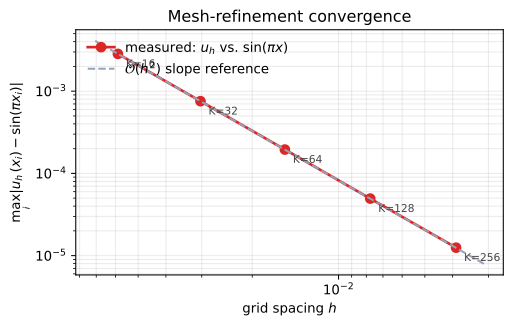
Log-log error vs. grid spacing \(h\). The points sit on a line of slope 2, the textbook rate for the 3-point stencil applied to a smooth solution. The dashed reference line is \(\mathcal{O}(h^2)\).#
Next steps#
Poisson on GPU — same code, a different executor, and a CPU-vs-GPU performance sweep.
Try replacing CG with GMRES and see what changes (it shouldn’t — both converge for SPD problems, GMRES just does more work).
Try a stronger preconditioner — e.g., ILU — and watch the iteration count drop.
For a 2D version of the same problem, see the upstream
nine-pt-stencil-solverexample.
See also